Online Thermal Camera Monitoring at a Substation: An Application Case Study
An application case study on replacing interval-based walk-downs with always-on coverage: how a fixed-mount online thermal camera is specified, mounted and alarmed, and the honest limits of what its readings can prove.
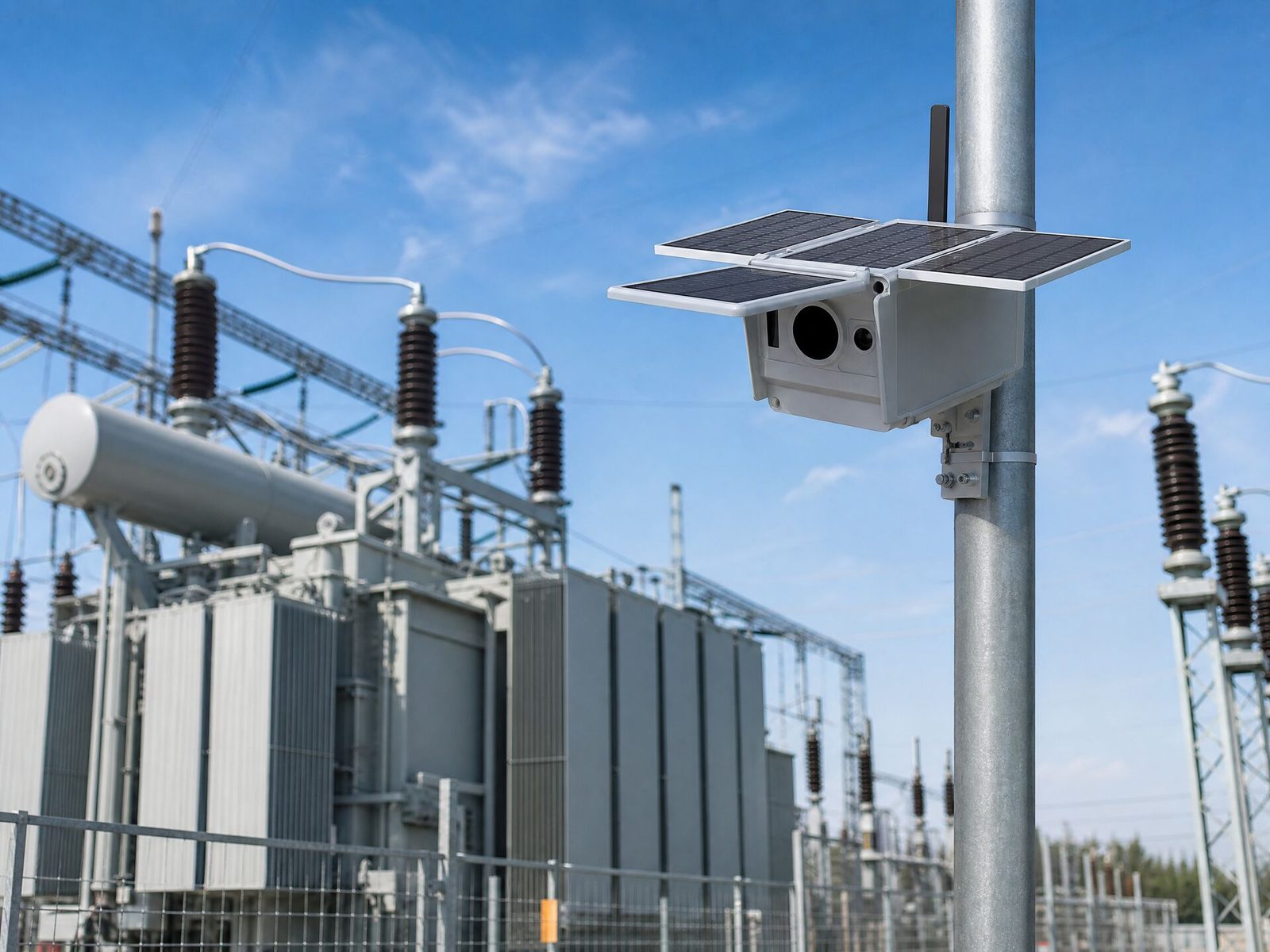
An online thermal camera does not replace the inspection engineer — it changes when the engineer receives the information. In this application case study we walk through how a utility client plans continuous thermal monitoring at a distribution substation: which assets are worth watching permanently, how the camera is specified, where it is mounted, how alarms are set, and what a fixed-mount thermal monitoring system can and cannot prove. The scenario is described generically. No customer, site, quantity or measured result is disclosed.
The core problem is simple. A substation is inspected intensively on a few days a year, and a thermal fault is present every day. Whether a joint reads hot depends on load, ambient temperature, wind, solar gain and time of day. A programmed walk-down samples one moment; continuous thermal monitoring samples the whole trend.
- The Short Answer
- Why Periodic Inspection Misses the Faults That Matter
- What Continuous Monitoring Changes on Site
- Choosing the Online Camera for Each Zone
- Solar-Powered or Grid-Powered Fixed Cameras?
- The Deployment Workflow: Mount, Power, Network, Alarms
- Setting Alarm Thresholds That Do Not Cry Wolf
- How It Complements Handheld Inspection
- What Online Monitoring Cannot Prove
- What to Send for a Quotation
- Frequently Asked Questions
- The Bottom Line
The Short Answer
An online thermal camera looks at the same joints, bushings, terminations and clamp connections every few minutes instead of once or twice a year. It catches load- and weather-dependent hot spots that a scheduled walk-down happens to miss, and it hands the maintenance team a trend instead of a single reading. It does not confirm a defect on its own: a suspect alarm still needs a manual thermal survey and, where relevant, a partial-discharge or contact-resistance check before anyone plans work.
Why Periodic Inspection Misses the Faults That Matter
Thermography detects a fault by the heat it produces, and heat output rises with current. A loose connection that is barely warm at 30% load can be clearly hot at 80% load. If the annual survey is carried out on a mild day at moderate load, a developing fault can be visually unremarkable — and the report will read "no significant findings" while the defect continues to grow.
The same applies to ambient conditions. A joint that reads +35 °C over ambient in still air and full sun can read several degrees lower in wind or after a rain shower. None of that changes the defect; it only changes whether the camera sees it on the day the crew arrives.
For a substation with a large asset count, the practical answer has been to inspect more often. That is expensive, and it still samples rather than watches. Continuous thermal monitoring changes the sampling problem into a coverage problem: a modest number of fixed cameras watch the highest-consequence targets every day, and the mobile team is sent where an alarm has already fired.
For survey workflow and handheld detail, see infrared camera for electrical inspections: field workflow and thermal camera temperature range for electrical inspection.
What Continuous Monitoring Changes on Site
The difference is not simply "more images". It is a change in the decision the data supports. A walk-down answers "is there a hot spot today?". A monitoring system answers "which target is warming relative to the others, and since when?". That second question is what lets a maintenance planner prioritise a repair before the next scheduled outage rather than discovering it during one.
| Aspect | Periodic handheld inspection | Continuous online monitoring |
|---|---|---|
| Coverage | Whole site, a few days per year | Selected critical targets, every day |
| Load dependency | Reads one load condition | Reads the full load and weather cycle |
| Output | Report with spot readings and images | Trend plus threshold alarms |
| Trigger for action | The next scheduled survey | The alarm, in near real time |
| Confirms a defect? | Yes, with an operator present | No — it raises and trends the alarm |
| Best used for | Full-site survey, diagnosis, reporting | Assets that are hard or costly to walk down |
The two are complementary, not competing. The monitoring layer decides when attention is needed; the handheld survey decides what is wrong and documents it. Programmes that try to replace the survey entirely usually end up with alarms that nobody has the evidence to close.
Choosing the Online Camera for Each Zone
Not every zone needs the same instrument. The two decisions that drive the model choice are target size and mounting distance. A wide cabinet row watched from a few metres is a different optical problem from a single terminal watched from twenty. The table below maps the four fixed-camera families we supply to the zone they suit.
| Model | IR resolution | Power / autonomy | Connectivity | Typical zone |
|---|---|---|---|---|
| WY20 Series | 160×120 / 256×192 | Solar; ≥15 days battery reserve without solar at 25 °C | 4G to cloud, SMS and email alarm | Outdoor bay or cabinet row, wide and close, no grid power |
| WY30 Series | 384×288 / 640×512 | Solar; electric focus | 4G cloud monitoring, 1080P visible channel | Longer distance where small targets must be resolved |
| Mini PTZ Series | 640×512 | Fixed installation | 360° rotation, 25× optical zoom | One camera covering several bays in turn |
| Speed Dome Series | 640×512 | Fixed installation | 200°/s speed, ONVIF | Preset patrol and VMS / SCADA integration |
The rule that saves the most money on a monitoring project is decided before the quotation: fix the smallest target you must see and the distance you must see it from. Resolution, not brand, is what either resolves that target or does not.
The WY20 series is the entry point where power and network are the constraint: it runs from a solar panel, stores to an SD card and reports over 4G with an SMS and email alarm. The WY30 series moves up to 384×288 or 640×512 with an electric focus and a 1080P visible channel, which is what you specify when the camera must resolve a termination or a clamp at longer range. Where one camera must cover several bays, a PTZ model at 360° with 25× zoom or a speed dome with ONVIF integration trades continuous coverage of one target for scheduled patrols of many. The full family sits under online thermal cameras.
Solar-Powered or Grid-Powered Fixed Cameras?
Most substations already have auxiliary power, and pulling a supply to a mast is a cable route, a protection question and a permit. Where that route is long or the structure is difficult, a solar-powered camera with a 4G backhaul removes both the cable and the network run. The trade-off is autonomy: the camera must survive the worst week of the year at that site, not the average week.
Two specifications therefore matter more than the marketing headline on a solar camera. The first is the battery reserve without solar charging — the WY20 series is quoted at 15 days at 25 °C, and cold or heavily overcast conditions reduce that. The second is standby power, which on the WY20 series is quoted at 0.01 W or less, because it sets how much panel and battery the site really needs. Site-specific autonomy is confirmed per project; it is not a fixed number that transfers from one country to another.
The Deployment Workflow: Mount, Power, Network, Alarms
A monitoring deployment is not an installation job that starts when the camera arrives. It starts with a target list and ends with an alarm that someone owns. The workflow that keeps a project on schedule looks like this:
- List the targets, not the equipment. Pick the joints, terminations, bushings, disconnectors and transformer surfaces whose failure would matter most, and note the load they carry.
- Fix distance and field of view before the model. Confirm the mounting point, the line of sight, and whether the camera sees the whole row or only part of it. A blocked or side-on view cannot be corrected later by resolution.
- Decide power and network. Grid supply with a fixed network, or solar with 4G. Confirm cabinet space, surge protection and who owns the SIM or the network link.
- Set up the alarm route. Decide who receives the alarm, in what channel, and what the first action is. An alarm with no owner is a data point, not a control.
- Baseline the targets. Record the first weeks of readings under different loads so the threshold is set against this site, not a generic number.
- Confirm the documentation. Certification documents, warranty terms and any calibration records are confirmed per model and per quotation.
Setting Alarm Thresholds That Do Not Cry Wolf
The fastest way to kill a monitoring programme is an alarm that fires constantly. A raw absolute temperature threshold is almost always the wrong setting, because a busbar at 60 °C can be normal in summer and alarming in winter. What matters is the difference between the target and a reference in the same field of view, under the same load and the same weather.
A threshold set against the site's own baseline, in the same field of view, under the same load, will outperform any generic temperature limit copied from a datasheet or another project.
Practical threshold design therefore uses three ideas together. First, a delta above a reference — the same joint measured against its neighbours or against the same joint on another phase. Second, a rise over time — a joint that is slowly climbing across weeks is a developing fault even before it crosses any absolute line. Third, an absolute ceiling as a backstop, set high enough that it only fires when something is genuinely wrong. Emissivity, target angle and the reflection of the sun or a nearby hot surface all affect the reading, which is why the baseline step above cannot be skipped.
How It Complements Handheld Inspection
When an alarm fires, someone still has to go and look. That is the job of the handheld camera, and it is where the reporting happens. For panel, motor and switchgear work the EasIR series covers the professional tier at 384×288 with a net thermal sensitivity of 15 mK or better, which is enough to separate a real hot spot from reflected heat. For high-temperature processes or detailed diagnostic work the H6 in the H Series adds 640×480, a wider measurement range up to 2000 °C and a TwinView dual field of view. For the finest detail and the largest coverage per frame, the PT II series reaches 1280×1024.
The relationship is simple: the fixed camera decides where to look, and the handheld camera decides what is true. Teams that run both reach a confirmed finding faster than teams that only run one.
What Online Monitoring Cannot Prove
Online thermal monitoring is a screening and trending tool, and it should be sold and bought as one. It cannot confirm the internal cause of a hot spot, cannot measure contact resistance, and cannot see a defect that produces no heat at the load present. A partial-discharge fault with no thermal signature will stay invisible to it, which is why a combined programme pairs thermal monitoring with acoustic or transient earth voltage screening for the assets where discharge is the risk. Where an electrician would need to open a compartment or take the equipment out of service to confirm a cause, the monitoring system cannot replace that step — it can only tell them where to start.
It also has physical limits that no specification removes: a target that is occluded, a mounting position with a poor angle, a lens fogged by condensation, or a wasp nest over the window. A monitoring programme is only as good as the maintenance of the monitoring system itself.
What to Send for a Quotation
An online camera can be sized properly from a short, specific brief. If you can supply the following, a supplier can confirm a model, an optic and a mounting concept without guessing:
- The asset list and the size of the smallest target you must resolve.
- The mounting distance and the available structure, with a description of the line of sight.
- Power availability and network availability at the point of mounting.
- The temperature range and accuracy you are working to, and the alarm channels you need.
- Quantity, delivery country, and the documentation or certification you must file.
If you are still comparing fixed and portable instruments, start from the side-by-side comparisons and the product range, or send the application through procurement support and we will confirm which class of instrument meets the specification you are buying against.
Frequently Asked Questions
Does an online thermal camera replace handheld thermal inspection?
No. A fixed online camera raises an alarm when a target crosses a threshold; a handheld survey confirms what the alarm means. Most programmes use continuous monitoring for the assets that cannot be walked down often, and handheld cameras for the detailed survey and reporting.
Can a solar-powered online thermal camera work without grid power?
Yes. The WY20 and WY30 series are solar-powered and transmit over 4G. The WY20 keeps a battery reserve, quoted at 15 days at 25 °C without solar charging, so the camera keeps reporting through short periods of poor weather. Site autonomy always has to be confirmed for the specific location and season.
What resolution is needed for continuous substation monitoring?
It depends on target size and distance. The WY20 series at 160×120 or 256×192 suits wide, close coverage of a cabinet row or a single bay. The WY30 series at 384×288 or 640×512 is used where small targets such as cable terminations or clamps must be resolved at a longer distance.
How do alarms reach the maintenance team?
The WY20 series supports SMS and email alarms with scheduled 4G image transmission. Network PTZ models support ONVIF for integration with a VMS or SCADA-side monitoring system. The exact alarm channels and integrations are confirmed per model and project.
What should a buyer send to get an online camera quotation?
Send the target assets and their sizes, the mounting distance and available structure, power and network availability, the required temperature range and alarms, the quantity, the delivery country and any documentation you need. That is enough to size both the camera and the optics.
The Bottom Line
Continuous thermal monitoring is worth building where the cost of a missed fault is higher than the cost of watching the target every day. It is not a replacement for inspection; it is a way to make the inspection team arrive at the right asset at the right time. Plan it as a coverage decision — smallest target, distance, power, network, alarm owner — and the optics and the model almost choose themselves. Unitech Tools coordinates selection, quotation and export for the online camera range and the portable inspection instruments that support it.
Planning continuous thermal monitoring for a substation?
Send the target list, the smallest target size, the mounting distance, the available power and network, the required alarms and the delivery country. We will confirm which online camera class and optic meets the specification, and whether we are the right supplier for the job.